Humble Spider
Full-stack ETL application that extracts public Humble Bundle book bundle data, normalizes it with Python, stores it in PostgreSQL or SQLite, and exposes it through a FastAPI API with a Vue 3 dashboard.
Documentation
Humble Bundle ETL Explorer
A full-stack ETL application that extracts public Humble Bundle book bundle data, normalizes it with Python, persists it with SQLAlchemy and exposes it through a FastAPI API with a Vue 3 dashboard.
This project was built to demonstrate practical backend and full-stack skills around web scraping, data normalization, database persistence, API design, authentication, Docker-based execution and frontend/API integration.
This project is not affiliated with Humble Bundle. It was created as a technical portfolio project using publicly available bundle information.
Project Summary
humbleBundle is a full-stack data application built around a real ETL workflow.
The project collects public book bundle data from Humble Bundle, extracts embedded structured data from the source pages, normalizes the result with Python, validates records with Pydantic, stores bundle information in a database and exposes the data through a FastAPI backend.
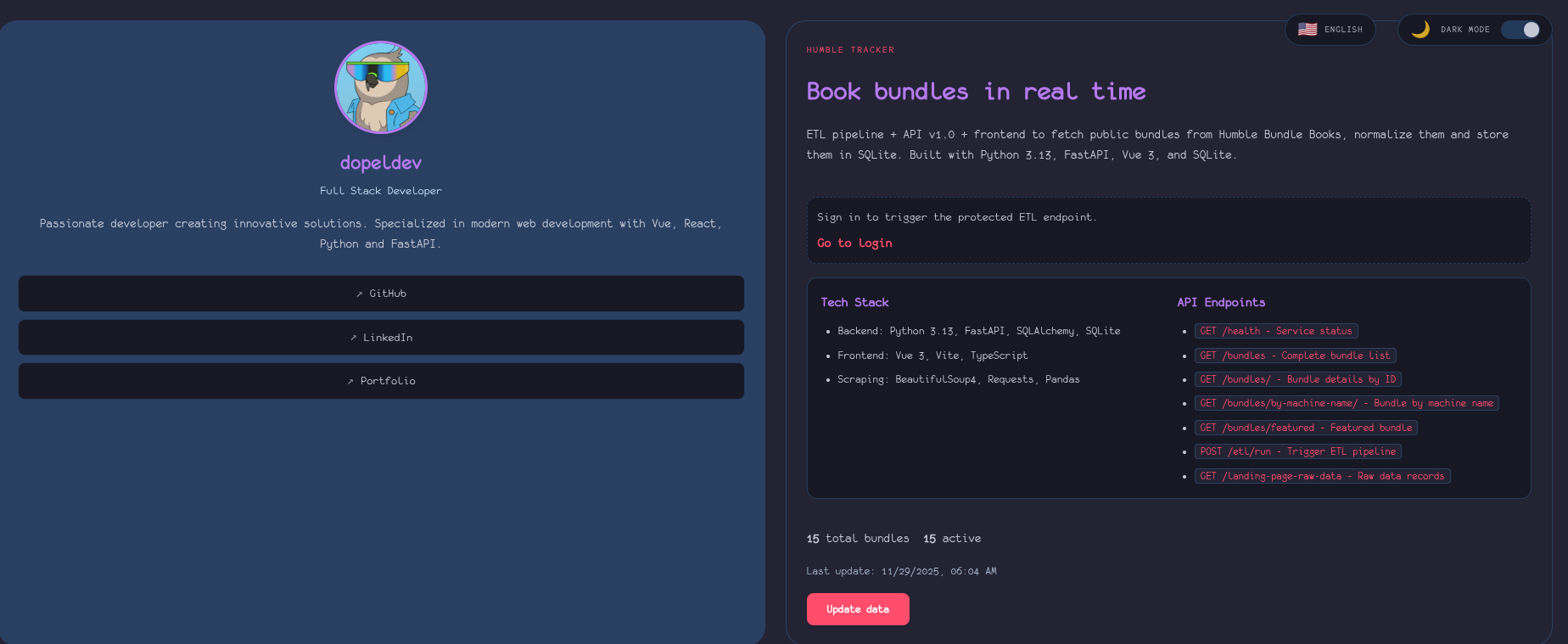
A Vue 3 frontend consumes the API and provides a dashboard for browsing bundles, inspecting raw source snapshots and triggering protected ETL operations when authenticated.
The project supports two database modes:
- PostgreSQL for Docker Compose and production-style execution.
- SQLite for local development and quick testing.
This makes the project more complete than a basic scraper because it includes a data pipeline, persistence layer, API, authentication, frontend interface and containerized runtime.
What This Project Demonstrates
This project demonstrates my ability to build a complete data-driven application from collection to presentation.
Key skills demonstrated:
- Web scraping with Python.
- Extracting embedded JSON from public web pages.
- Data normalization with pandas.
- Data validation with Pydantic.
- Database modeling with SQLAlchemy.
- PostgreSQL integration for Docker-based execution.
- SQLite fallback for local development.
- FastAPI backend development.
- REST API endpoint design.
- JWT-based authentication.
- Protected backend actions.
- Vue 3 frontend development.
- TypeScript frontend structure.
- Frontend/API integration with Axios.
- Internationalization with
vue-i18n. - Light/dark UI behavior.
- Docker Compose multi-service setup.
- Environment-based configuration.
- Backend and frontend verification commands.
Problem
Public bundle pages can contain useful product information, but that information is not always available in a clean API-ready format.
A developer who wants to collect, analyze or display this data needs to solve several technical problems:
- Fetch the source page.
- Locate embedded structured data.
- Extract bundle metadata.
- Visit individual bundle pages for richer details.
- Normalize inconsistent fields.
- Convert dates and URLs.
- Validate records before storing them.
- Remove expired bundles.
- Store current bundle data and raw source snapshots.
- Expose the data through an API.
- Protect sensitive actions such as running the ETL pipeline.
- Build a frontend that can consume and display the API data.
humbleBundle was created to solve that workflow end to end.
Solution
The solution is a full-stack ETL system divided into three main layers:
-
Spider / ETL pipeline
A Python pipeline downloads public bundle pages, extracts embedded JSON, enriches each bundle with detail-page data, normalizes the result and validates records. -
FastAPI backend
A backend API exposes bundle data, raw source snapshots, authentication endpoints and a protected ETL trigger. -
Vue 3 frontend
A frontend dashboard consumes the API, displays bundles, supports authentication and allows ETL execution from the UI when a valid token is available.
The application can run locally with SQLite or through Docker Compose with PostgreSQL.
Architecture
Public Humble Bundle Pages
          │
          ▼
┌────────────────────────┐
│ Python Spider / ETL    │
│ Requests + BeautifulSoup│
└───────────┬────────────┘
            │
            ▼
┌────────────────────────┐
│ Data Normalization     │
│ pandas + Pydantic      │
└───────────┬────────────┘
            │
            ▼
┌────────────────────────┐
│ SQLAlchemy Persistence │
│ PostgreSQL / SQLite    │
└───────────┬────────────┘
            │
            ▼
┌────────────────────────┐
│ FastAPI Backend        │
│ API + Auth + ETL Run   │
└───────────┬────────────┘
            │
            ▼
┌────────────────────────┐
│ Vue 3 Frontend         │
│ Dashboard + Login UI   │
└────────────────────────┘
Stack
| Layer | Technology |
|---|---|
| Scraping | Python, Requests, BeautifulSoup |
| Data Processing | pandas |
| Validation | Pydantic |
| Configuration | pydantic-settings |
| ORM | SQLAlchemy 2 |
| Production-style Database | PostgreSQL 16 |
| Local Database | SQLite + aiosqlite |
| API | FastAPI, Uvicorn |
| Authentication | JWT with python-jose |
| Password Hashing | bcrypt over SHA-256 normalized passwords |
| Frontend | Vue 3, Vite, TypeScript |
| Frontend Routing | Vue Router |
| HTTP Client | Axios |
| Internationalization | vue-i18n |
| Styling | Sass |
| Testing / Verification | unittest, Vitest, frontend build checks |
| Runtime | Docker Compose |
Main Features
ETL Pipeline
The ETL pipeline collects public bundle data and transforms it into structured records.
The pipeline performs several steps:
- Downloads the Humble Bundle books landing page.
- Extracts embedded landing page JSON.
- Normalizes bundle data with pandas.
- Converts dates, URLs and structured fields.
- Visits individual bundle pages for richer data.
- Extracts price tiers, book lists, MSRP totals and raw HTML.
- Validates bundle records with Pydantic.
- Removes expired bundles.
- Persists active bundles by
machine_name. - Stores raw source snapshots with hashes.
This shows data engineering thinking beyond a simple scraper.
FastAPI Backend
The backend exposes the normalized data through a FastAPI API.
Public endpoints include:
GET /health
GET /bundles
GET /bundles/{bundle_id}
GET /bundles/by-machine-name/{machine_name}
GET /bundles/featured
GET /landing-page-raw-data
GET /landing-page-raw-data/latest
GET /landing-page-raw-data/{raw_data_id}
Authentication endpoints include:
POST /auth/login
GET /auth/me
Protected endpoint:
POST /etl/run
The protected ETL endpoint requires a Bearer token and allows authenticated users to trigger the scraper from the API or frontend.
Example API Responses
GET /health
{
  "status": "ok"
}
GET /bundles/featured
{
  "id": "bundle-id",
  "machine_name": "example-book-bundle",
  "tile_name": "Example Book Bundle",
  "product_url": "https://www.humblebundle.com/books/example",
  "category": "books",
  "msrp_total": 450.0,
  "is_active": true
}
POST /auth/login
{
  "access_token": "jwt-token",
  "token_type": "bearer"
}
The exact shape of each response depends on the database state and the source data available at the time of execution.
Authentication
The project includes JWT authentication for protected operations.
The user model is stored in the configured database. An admin user can be created or updated automatically using environment variables.
Supported admin configuration includes:
DB_ADMIN_USERNAME=admin
DB_ADMIN_EMAIL=admin@example.com
DB_ADMIN_PASSWORD_PLAIN=admin_password
The project also includes CLI utilities for creating users and hashing passwords.
This makes the project stronger as a portfolio piece because it shows that the ETL trigger is not left as an open public action.
Frontend
The frontend is a Vue 3 SPA built with Vite and TypeScript.
Main frontend features:
- Main dashboard for bundle data.
- Login page connected to the backend auth endpoint.
- JWT session stored in
localStorage. - Floating logout control.
- Light/dark theme.
- English/Spanish language switcher.
- Bundle views.
- Raw data views.
- JSON open/download utilities.
- ETL execution from the UI when authenticated.
Routes include:
/
 /login
The frontend can be configured with:
VITE_API_BASE_URL=http://localhost:5002
When the variable is not set, the client can fall back to a proxied deployment path.
Database
The project supports two database modes.
PostgreSQL Mode
PostgreSQL is used by the Docker Compose and production-style path.
It is configured with:
DB_DB_TYPE=postgresql
DB_PGUSER=postgres
DB_PGPASSWORD=postgres
DB_PGDATABASE=humble_bundle
DB_PGHOST=postgres
DB_PGPORT=5432
PostgreSQL mode uses sync and async drivers for different parts of the application.
SQLite Mode
SQLite is available for local development and quick tests.
It is configured with:
DB_DB_TYPE=sqlite
DB_DB_PATH=humble_bundle.db
SQLite makes the project easier to run without external services, while PostgreSQL makes the Docker path closer to a production-style backend.
Current Tables
The project stores three main types of data:
| Table | Purpose |
|---|---|
bundle | Normalized bundle metadata, dates, active state, tiers, books, images, MSRP and raw HTML |
landing_page_raw_data | Raw source snapshots, source URL, hash, date and optional version |
user | Authentication users with username, email, password hash and creation date |
This structure allows the application to store both cleaned data and raw source snapshots for debugging or inspection.
Docker Compose Setup
The project can run with Docker Compose using PostgreSQL.
Main services:
postgres: PostgreSQL database with persistent volume.api: FastAPI backend.frontend: Vue/Vite frontend preview/container.
Recommended command:
cp .env.example .env
docker compose up -d --build
Useful Makefile commands:
make docker-up
make docker-down
make docker-restart
Local Development
Backend setup:
python3 -m venv .venv
source .venv/bin/activate
pip install -r requirements.txt
make db-init
make api
Run the ETL:
make etl
Frontend setup:
cd frontend
npm install
npm run dev
Build frontend:
npm run build
Environment Variables
Example configuration:
DB_DB_TYPE=postgresql
DB_PGUSER=postgres
DB_PGPASSWORD=postgres
DB_PGDATABASE=humble_bundle
DB_PGHOST=postgres
DB_PGPORT=5432
DB_SQL_ECHO=false

DB_JWT_SECRET_KEY=change-this-secret
DB_JWT_ACCESS_TOKEN_EXP_MINUTES=60

DB_ADMIN_USERNAME=admin
DB_ADMIN_EMAIL=admin@example.com
DB_ADMIN_PASSWORD_PLAIN=admin_password

VITE_API_BASE_URL=http://localhost:5002
FRONTEND_PORT=3002
The .env.example file makes the project easier to run and safer to configure without hardcoding secrets directly into the application.
Repository Structure
humbleBundle/
├── api/
│   ├── main.py
│   ├── security.py
│   └── ...
├── spider/
│   ├── core/
│   ├── scrapers/
│   ├── database/
│   ├── schemas/
│   ├── config/
│   ├── cli/
│   └── utils/
├── frontend/
│   ├── src/
│   │   ├── views/
│   │   ├── components/
│   │   └── composables/
│   └── package.json
├── tests/
├── docs/
├── .env.example
├── Dockerfile
├── docker-compose.yml
├── docker-compose.dev.yml
├── docker-compose.prod.yml
├── Makefile
├── requirements.txt
├── README.md
└── LICENSE
Verification
Backend verification:
python -m compileall -q api spider tests
python -m unittest tests/test_security.py
Frontend verification:
cd frontend
npm run test:run
npm run build
Docker verification:
docker compose up -d --build
docker compose ps
These commands help validate syntax, authentication behavior, frontend tests, production build and Docker startup.
Technical Decisions
Why FastAPI?
FastAPI was selected because it provides a clean structure for typed APIs and integrates well with Pydantic validation.
It is a good fit for exposing normalized ETL data through clear HTTP endpoints.
Why SQLAlchemy?
SQLAlchemy was used to separate persistence logic from scraping and API logic.
It also allows the project to support more than one database backend.
Why PostgreSQL and SQLite?
PostgreSQL is used for the Docker/production-style path because it better represents real backend deployments.
SQLite is kept as a local fallback because it makes development faster and easier when a full Docker database is not needed.
Why Vue 3?
Vue 3 was used to build an interactive frontend that consumes the FastAPI backend.
It allows the project to demonstrate frontend/API integration without turning the project into a frontend-only demo.
Why JWT Authentication?
JWT authentication was added to protect operations such as triggering the ETL pipeline.
This improves the backend design because data-changing operations are not left fully public.
Project Status
Current status: Portfolio-ready MVP
The project already demonstrates:
- ETL pipeline development.
- Web scraping.
- Data normalization.
- SQLAlchemy persistence.
- PostgreSQL and SQLite database modes.
- FastAPI backend.
- JWT authentication.
- Protected ETL execution.
- Vue 3 frontend.
- Docker Compose execution.
- Basic backend and frontend verification.
The next step is to improve project maturity with CI, a real GitHub release and more complete automated tests.
Lessons Learned
This project helped me practice:
- Building an ETL pipeline from a real public source.
- Extracting embedded JSON from web pages.
- Normalizing semi-structured data.
- Validating records with Pydantic.
- Modeling data with SQLAlchemy.
- Supporting PostgreSQL and SQLite modes.
- Building FastAPI endpoints.
- Adding JWT authentication.
- Connecting a Vue frontend to a backend API.
- Managing frontend state around authentication.
- Running a full-stack project with Docker Compose.
- Writing technical documentation for a multi-layer project.
Professional Value
This project strengthens my profile as a backend/full-stack developer because it demonstrates a complete data workflow.
It is especially relevant for roles involving:
- Backend development.
- API development.
- Python services.
- Data pipelines.
- Web scraping.
- Data normalization.
- SQL databases.
- PostgreSQL.
- FastAPI.
- Vue frontend integration.
- Docker Compose.
- Authentication flows.
Unlike a simple CRUD or tutorial project, this application works with an external public source, transforms messy data, persists it and exposes it through an authenticated full-stack interface.
Role
My role in this project:
- Designed the ETL pipeline.
- Implemented the Humble Bundle spider.
- Added per-bundle detail extraction.
- Built data normalization and validation logic.
- Designed SQLAlchemy persistence models.
- Added PostgreSQL and SQLite support.
- Built the FastAPI backend.
- Implemented authentication endpoints.
- Protected the ETL execution endpoint.
- Built the Vue 3 frontend dashboard.
- Added frontend authentication behavior.
- Created Docker Compose configuration.
- Wrote project documentation.
Repository
GitHub repository:
https://github.com/dopelDev/humbleBundle
Short Description
Full-stack ETL application that extracts public Humble Bundle book bundle data, normalizes it with Python, stores it in PostgreSQL or SQLite, and exposes it through a FastAPI API with a Vue 3 dashboard.
Tags
Python
FastAPI
Vue 3
TypeScript
Vite
PostgreSQL
SQLite
SQLAlchemy
Docker Compose
ETL
Scraping
BeautifulSoup
Requests
pandas
Pydantic
JWT
Authentication
Backend
Full-Stack
Data Pipeline
Comments (0)
No comments yet. Be the first to comment!
Your comment will be reviewed before being published.